
The 211 LA Taxonomy is now referred to as the 211 Human Services Indexing System (211HSIS).
We transitioned from delivering the 211HSIS taxonomy via XML to delivery via APIs.
We launched the new 211HSIS website 211hsis.org on January 15th, 2024.
Below is some additional information if you are looking to access the new 211HSIS website and you are:
An account administrator with an active subscription
You received an email with the subject line “211HSIS Website Launch Sign-up Information and Subscription Code”. Please locate this email for more information.
Looking to renew your subscription
Please sign up with a new account and start a new subscription on 211hsis.org.
For a guide on how to register and start a new subscription click here.
Note: If your previous subscription expired and you are continuing to use the 211HSIS taxonomy within your organization, please complete this sign up process ASAP. Otherwise, you will be in violation of the subscription agreement which was signed at the start of your previous subscription.
New to the 211HSIS taxonomy
Welcome! Please find us over at our new website 211hsis.org.
If you have any questions, please email: 211hsisapitransition@211la.org
The new 211HSIS website launches on January 15th, 2024! Account administrators with an active subscription will receive an email in early January with a code to register their new account for the updated 211HSIS site. If your subscription has lapsed the new website will offer the opportunity to re-subscribe.
Thank you for your interest in obtaining or renewing your 211 HSIS taxonomy subscription
211 LA is preparing to launch delivery of the 211 Human Services Indexing System (HSIS) (formerly the 211 LA Taxonomy) via an API. The API will enable licensed vendors and licensed users to receive real time updates to the HSIS taxonomy. As part of the transition to delivery via API, the current process of providing an XML download will be retired in January 2024. 211 LA is working with its licensed vendors to enable integration of the API within their applications. We are targeting to have our licensed vendor transition completed by January 2024.
The 211 HSIS website is also being updated. The updates will continue to support the existing filtering functionality and “how-to” guides you enjoy today as well as additional features including enhanced search functionality.
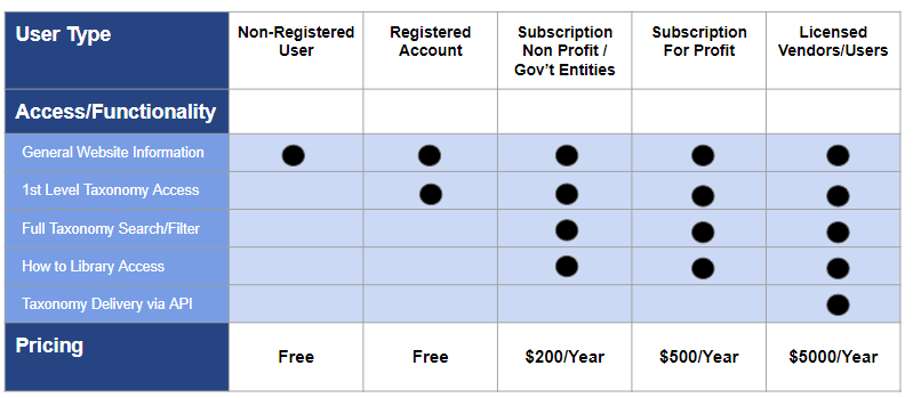
Below is a table summarizing the new subscription tiers related to the Website and HSIS taxonomy:
Below is a table describing some common user situations and highlights the considerations for and impact on your organization with respect to desired functionality and 211 HSIS access.
| Situation | What it means for my organization |
|---|---|
| Current Subscriber who uses a licensed vendor or does not need to download the XML file |
|
| New Subscriber who uses a licensed vendor or does not need to download the XML file |
|
| Current or New Subscriber who need access to the HSIS taxonomy and do not/will not use a licensed vendor |
|
Check out our FAQ on Subscriber API Activity here.
If you have any questions regarding the HSIS taxonomy API and the ongoing transition, please send an email to:
211HSISAPITransition@211la.org
We will continue to provide updates and information regarding the HSIS taxonomy as the transition plans and materials are finalized.
Thank you for your continued support and use of the HSIS taxonomy within the I&R community!!
The 211 HSIS TeamPrivacy Policy. Terms of Use. Contact 211 LA County.
The 211 LA Taxonomy is now referred to as the 211 Human Services Indexing System (211HSIS).
We transitioned from delivering the 211HSIS taxonomy via XML to delivery via APIs.
We launched the new 211HSIS website 211hsis.org on January 15th, 2024.
Below is some additional information if you are looking to access the new 211HSIS website and you are:
An account administrator with an active subscription
You received an email with the subject line “211HSIS Website Launch Sign-up Information and Subscription Code”. Please locate this email for more information.
Looking to renew your subscription
Please sign up with a new account and start a new subscription on 211hsis.org.
For a guide on how to register and start a new subscription click here.
Note: If your previous subscription expired and you are continuing to use the 211HSIS taxonomy within your organization, please complete this sign up process ASAP. Otherwise, you will be in violation of the subscription agreement which was signed at the start of your previous subscription.
New to the 211HSIS taxonomy
Welcome! Please find us over at our new website 211hsis.org.
If you have any questions, please email: 211hsisapitransition@211la.org
The new 211HSIS website launches on January 15th, 2024! Account administrators with an active subscription will receive an email in early January with a code to register their new account for the updated 211HSIS site. If your subscription has lapsed the new website will offer the opportunity to re-subscribe.
Thank you for your interest in obtaining or renewing your 211 HSIS taxonomy subscription
211 LA is preparing to launch delivery of the 211 Human Services Indexing System (HSIS) (formerly the 211 LA Taxonomy) via an API. The API will enable licensed vendors and licensed users to receive real time updates to the HSIS taxonomy. As part of the transition to delivery via API, the current process of providing an XML download will be retired in January 2024. 211 LA is working with its licensed vendors to enable integration of the API within their applications. We are targeting to have our licensed vendor transition completed by January 2024.
The 211 HSIS website is also being updated. The updates will continue to support the existing filtering functionality and “how-to” guides you enjoy today as well as additional features including enhanced search functionality.
Below is a table summarizing the new subscription tiers related to the Website and HSIS taxonomy:
Below is a table describing some common user situations and highlights the considerations for and impact on your organization with respect to desired functionality and 211 HSIS access.
| Situation | What it means for my organization |
|---|---|
| Current Subscriber who uses a licensed vendor or does not need to download the XML file |
|
| New Subscriber who uses a licensed vendor or does not need to download the XML file |
|
| Current or New Subscriber who need access to the HSIS taxonomy and do not/will not use a licensed vendor |
|
Check out our FAQ on Subscriber API Activity here.
If you have any questions regarding the HSIS taxonomy API and the ongoing transition, please send an email to:
211HSISAPITransition@211la.org
We will continue to provide updates and information regarding the HSIS taxonomy as the transition plans and materials are finalized.
Thank you for your continued support and use of the HSIS taxonomy within the I&R community!!
The 211 HSIS Team